Lab 9
10 November, 2023 - Classes & Errors
- PyCharm recap
- Overview of This Lab
- Exercise 1: Fix the code (standard)
- Exercise 2: Sequence iterators & generators (standard)
- Exercise 3: Counting with dictionaries (standard)
- Exercise 4: Two’s Complement (challenge, very hard)
- Exercise 5: Creating Logic Gates & inheritance (challenge, very hard)
Welcome to week 10, lab 9!
PyCharm recap
This week we continue using PyCharm and running code in the terminal. In lab 7 you can find information about: installing anaconda, opening projects, configuring unittests, reading unittests results, and debugging.
Overview of This Lab
This week we have five different exercises that range in difficulty:
- Exercise 1: Fix the code (standard)
- Exercise 2: Sequence iterators & generators (standard)
- Exercise 3: Counting with dictionaries (standard)
- Exercise 3a: Counting with dictionaries (standard)
- Exercise 3b: Counting with defaultdicts (challenge, medium)
- Exercise 3c: Displaying dictionaries with counts (challenge, hard)
- Exercise 4: Two’s Complement (challenge, very hard)
- Exercise 4 extra: Additional Arithmetic (challenge, very hard+)
- Exercise 5: Creating Logic Gates & inheritance (challenge, very hard)
- Exercise 5: Adding Additional Components (challenge, very hard+)
All students, regardless of experience, should be able to complete the three standard exercises. Whether you complete all three is up to you.
The six exercises marked as “challenge” provide additional practice for interested students. We believe that any student in this class who completes the standard exercises should be able to complete the “medium” difficulty challenge.
For more advanced students, you might find the more difficult Two’s Complement and Creating logic gates & inheritance exercises to be more interesting. Feel free to skip the standard exercises if you think they are insufficiently challenging. You can also look at previous labs for challenging exercises.
If you feel that this week’s challenges are too hard for you, feel free to do a challenging exercise from last week which should be easier now that you know more.
Exercise 1: Fix the code (standard)
In this exercise the code is already coded. However, there is a problem it does not pass all unittests. It is up to you to make the code work. To do this you are only are allowed to use try except statements.
Open exercise fix_the_code.py and fix the functions.
Exercise 2: Sequence iterators & generators (standard)
To get you started with iterators, we’ve provided an example iterator called Natural_numbers (all positive integers). This example can be found in both the exercise file sequence_iterators.py and below.
class Natural_numbers():
    """
    This example class creates iterable objects that give the natural numbers.
    (1, 2, 3, 4, 5, 6)    p(n) = p(n-1) + 1
    """
    def __init__(self):
        self.number = 1

    def __iter__(self):
        return self

    def __next__(self):
        next_output = self.number
        self.number += 1
        return next_output
In this exercise, you will implement the following sequences by making an iterable class:
 - Powers of five (1, 5, 25, 125, 625, 3125)       p(n) = p(n-1) * 5
 - Padovan        (1, 1, 1, 2, 2, 3, 4, 5, 7, 9)   p(n) = p(n-2) + p(n-3)
 - Powers of two  (1, 2, 4, 8, 16, 32, 64, 128)    p(n) = p(n-1) * 2
 - Factorial      (1, 1, 2, 6, 24, 120, 720, 5040) p(n) = p(n-1) * n
And the following sequence by making a generator function:
- Triangular (0, 1, 3, 6, 10, 15, 21, 28, 36) p(n) = p(n-1) + n
We will also practise with raise StopIteration to prevent infinite loops. Apply raise StopIteration to the power of two class. This is done by adding an extra initialization argument which determines the maximum value of the sequence.
At last, in this exercise we will look how we could combine iterable and getitem to return nth item. You will apply this to the Factorial class. Note: this is good when you need the nth number once, but if an index from a sequence is needed often, it would be better to store that sequence in a list and then use an index on that list. The reason is that otherwise you will recalculate the same values many times which is not efficient.
Open exercise sequence_iterators.py, follow the instructions and complete the classes and functions.
Exercise 3: Counting with dictionaries (standard)
In this exercise, we will have a look how to construct a dictionary that counts objects. There are many ways to implement this, however, some are more clear or faster than others. Also, you can sometimes find some bad suggestions on forums where they suggest code that was used in python2 and later was deprecated in python3. For example, the dict.has_key() method does no longer exist. Here, we will go over four different (and most used) solutions when dynamically filling a dictionary with keys and values.
The problem when dynamically filling a dictionary is that you do not know if a key exist or not, therefore the following code will break and throws the error KeyError on the third line because the key "d" does not exist (yet).
dct = {"a": 1, "b": 2}
dct["a"] += 1
dct["d"] += 1
The most used solution is to check with an if statement if the key exist or not. If it exists you just add one to the count, otherwise, you create the key and set in on one. The problem is that it is not immediately clear what the intent of the code is. After all, after a if statement can be anything.
if item not in dct:  # Test if the key "item" exists in the dictionary "dct".
    dct[item] = 1  # Create the key
else:
    dct[item] += 1  # Increment the value of the key
Possibly, a bit cleaner code can be created using the dct.get(key, defaultvalue) method. The advantage of using get is that it works the same as using square brackets [], but if they key does not exist it returns the default value. This code is commonly used if you are only interested in getting a value but not changing it. The code below is therefore a bit clunky.
dct[item] = dct.get(item, 0) + 1
The last option before using extra libraries is to just let the code crash on purpose. The upside is, it is fast and clear what you want to do. The downside is that some people don’t like to use try except when it is not needed. The idea is that you just try the code you want to execute namely incrementing the value and when it fails you create the key, see below.
try:
    dct[item] += 1
except KeyError:
    dct[item] = 1
Lastly, you can use a defaultdict from the library collections. This library has some very helpful datastructures. The idea of a defaultdict is that you expect that you will come across keys that don’t exist, but they should always be initiated the same way. In other words, they all should have the same default value. When using a defaultdict you do not need to change the increment code, but you give the dict a default value when creating the dict. The advantage is that this generates the cleanest and most readable code. However, there is one caveat. The outcome is not the same as the three other solutions because a dict is not the same type as a defaultdict. Also, the default is a bit more complicate then with .get(). A defaultdict has as default either a type with a boolean value false or function that return a default value. For example, a defaultdict with as default str gives new keys an empty string ("") as value.
from collections import defaultdict  # import defaultdict from collections
dct = defaultdict(int)  # creating the default dictionary with as default value the false value of an int (0).
dct[item] += 1  # you can just increment the item, if it does not exist it will be created.
Exercise 3a: Counting with dictionaries (standard)
In this exercise, you will be given a list of names and your job is to write a piece of code to count for each letter how many times it is used, open exercise has_key.py and complete the function count_letters.
Exercise 3b: Counting with defaultdicts (challenge, medium)
Exercise 3b has the same purpose as 3a only now you are asked to use a defaultdict. Open exercise has_key.py and complete the function count_letters_default_dict.
Exercise 3c: Displaying dictionaries with counts (challenge, hard)
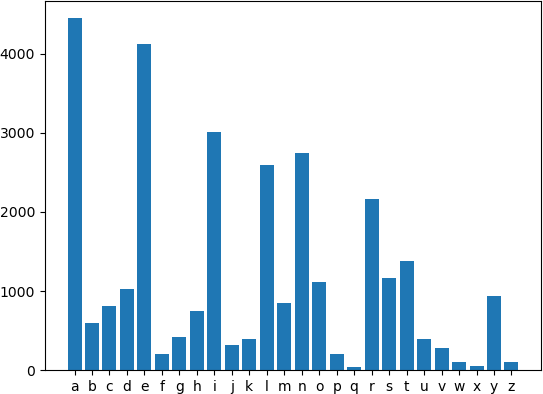
In this exercise, you will plot for each letter how many times it is used in the file names.txt. The plot should be in alphabetically order. Below you will find an image how it should look like. Colors are not mandatory nor the colorbar is mandatory. Keep in mind that both add additional challenge. Open exercise has_key.py and complete the script or the main function.
Below, you can find a solution for the basic exercise.
The image below is the result of adding colorbar and colors using cmap.
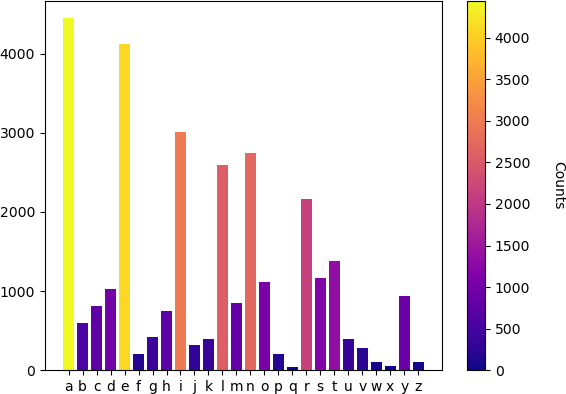
Hint: Use plt.bar from matplotlib.pyplot (this is commonly imported as import matplotlib.pyplot as plt). To get different colors, you can either add 26 colors or you can use a cmap (get_cmap) as function and use the values (counts) to calculate the colors. For the colorbar, you could use ScalarMappable in combination with plt.colorbar. Note, that there are probably many ways to create the plot.
Exercise 4: Two’s Complement (challenge, very hard)
In this exercise, we will implement two’s complement using a Byte class. This Byte class has one attribute __binary which consists of 8 Bit objects (8 bits). For information on two’s complement see this wiki. The idea of this exercise is that most functionality can be implemented using magic methods and have separate classes for executing bit level code and byte level code.
The exercise is therefore built in two parts.
First, you will implement the Bit class that contains the attribute __on which is True or False. This class should handle everything related to changing bits. In other words, the attribute __on should not be used outside the class Bit.
The Bit class should contain the following functionality:
- A init method, which can has as input either a string (
"0"/"1") or a int (0/1). - The addition of two bits, returning a carry over
Bitand the outcomeBit - A representation that is either
"0"or"1". - A method to convert a
Bitto anint - The
__eq__magic method is already implemented as it is needed for the unittests. - (optional) A method to reverse/negate a
Bit.
Second, you will implement the Byte class that contains the attribute __binary which consists of a list of 8 Bit objects. This class should handle everything related to two’s complement arithmetic. In other words, the attribute __binary should not be used outside the class Byte.
The Byte class should contain the following functionality:
- A init method, which can has as input either an int or a list of 8
Bitobjects. - The addition of two bytes, returning a new
Byteobject. - (optional, but recommended) A method to negate a
Byte. - The subtraction of two bytes, returning a new
Byteobject. - A representation that is a string of 8 zeros or ones.
- A method to convert a
Byteto anint - The
__eq__magic method is already implemented as it is needed for the unittests. - (optinal) A method for reversing a
Byte. - (optinal) A method for iterating over a
Byte.
Open exercise twos_complement.py and complete the classes.
Exercise 4 extra: Additional Arithmetic (challenge, very hard+)
To really push yourself, you can implement additional arithmetic for the Byte class. For example, you could implement multiplication which is not to hard as you can just add multiple byte together:
1110
0111
--- *
1110
1100
1000
----+
0010 = 2 = 98 modulo 8
Division is generally a lot harder and requires more steps, but using long division you could make it work.
Exercise 5: Creating Logic Gates & inheritance (challenge, very hard)
In this exercise, we will practise with classes and inheritance. You will use a class gate as a parent class for making new classes. Here, the class gate functions like a template and provides general method. The upside of a class like gate is that you don’t forgot to implement certain methods, but also some functionality can be inherited from the base class.
While, this exercise is more of a toy example on how to use these kinds of base classes with a template. This format is often used in datascience and AI. For example, implementing neural networks with pytorch work like this, where you only need to implement the init and forward method. Another example that uses these kinds of bases classes would be sklearn, where you often only implement a fit and predict method.
For this exercise, a base class is already implemented (instead of importing it). You only need to complete the child classes.
First, create the NAND class then use this gate to create the other gates. This is possible because a NAND gate is a universal gate.
Last, create a latch component (which can still be implemented as gate). The only difference is that you need to remember the internal memory. This is needed because some wires create feedback into the system itself.
Exercise 5: Adding Additional Components (challenge, very hard+)
In the first part of exercise 5, you made some basic gates and you first component. This is very limited, but you can extend this framework to a complete computer. Try to implement some extra functionality. For example, 4 bit data storage or ALU components.